

Automated
Google Ads
Bid and Budget Optimization
Automated Google Ads
Bids and Budgets Optimization
Automated
Google Ads
Bid and Budget Optimization
Level up campaigns’ performance with smart ad spend management.
Level up campaigns’ performance with smart ad spend management.

Maximize the potential of
Google Ads' performance
Unlock smarter optimization across all types of Google Ads campaigns using Smart Bidding strategies
Google Search Ads
Keep Search campaigns performing without constant manual adjustments.
Google Shopping
Allocate budget across your product catalog based on performance.
Performance Max
Scale top-performing campaigns while keeping spend under control.
App Campaigns
Optimize app campaign budgets based on installs and in-app actions.
Demand Gen
Respond to changing demand with smarter bid adjustments.
Bid & Budget
Intelligent Control
Achieve greater efficiency by enabling the G-MOS system to suggest or
fully implement changes made based on efficiency statistics.
Bids
Bidding that brings impact
Make manual changes based on data-driven recommendations, or enable fully automated adjustments. Choose the preferred ratio percentage in change management settings.
Make manual changes based on data-driven recommendations, or enable fully automated adjustments. Choose the preferred ratio percentage in change management settings.
Budgets
Budget Management at scale
Set performance adjustment coefficients, spend decrease ratio, and maximum budget over managed campaigns to align with expected results.
Set performance adjustment coefficients, spend decrease ratio, and maximum budget over managed campaigns to align with expected results.
Maximize the potential of
Google Ads' performance
Unlock smarter optimization across all types of Google Ads campaigns using Smart Bidding strategies
Google Search Ads
Keep Search campaigns performing without constant manual adjustments.
Google Shopping
Allocate budget across your product catalog based on performance.
Performance Max
Scale top-performing campaigns while keeping spend under control.
App Campaigns
Optimize app campaign budgets based on installs and in-app actions.
Demand Gen
Respond to changing demand with smarter bid adjustments.
Google Ads Campaigns Automation Benefits
Google Ads Campaigns
Automation Benefits
Google Ads Campaigns Automation Benefits
G‑MOS turns your Google Ads account into a fully automated performance engine.
Automated bid and budget updates
Smarter spend allocation
No manual errors
More time to focus on what matters
Transparency through detailed change logs
Better campaigns' performance
How G-MOS Bid and Budget Automation works
Our system analyzes performance, applies the right changes, and keeps your campaigns optimized automatically.

Step 1
Define Settings
Set the coefficients of changes in the indicators. Select the day the changes will be applied.
Limit the budget reduction and the maximum budget of all managed campaigns. Set the period of statistics analysis.
Step 2
Add preferred campaigns
Set Smart Bidding goals and choose how often G-MOS applies optimization changes. Optionally enable Seasonality Adjustments to adapt to expected demand changes.
Enable automatic keyword optimization to pause underperforming keywords.
Set Smart Bidding goals and choose how often G-MOS applies optimization changes. Optionally enable Seasonality Adjustments to adapt to expected demand changes.
Enable automatic keyword optimization to pause underperforming keywords.


Step 3
Achieve results
Now the system will automatically make changes as set.
It continuously evaluates multiple campaign performance signals to make smarter bid and budget decisions while helping you stay aligned with your business goals.
Now the system will automatically make changes as set.
It continuously evaluates multiple campaign performance signals to make smarter bid and budget decisions while helping you stay aligned with your business goals.
How G-MOS Bid and Budget Automation works
Our system analyzes performance, applies the right changes, and keeps your campaigns optimized automatically.
Step 1
Define Settings
Set the coefficients of changes in the indicators. Select the day the changes will be applied.
Set the limits of budget reduction and the maximum budget of all managed campaigns. Set the period of statistics analysis.

Step 2
Add preferred campaigns
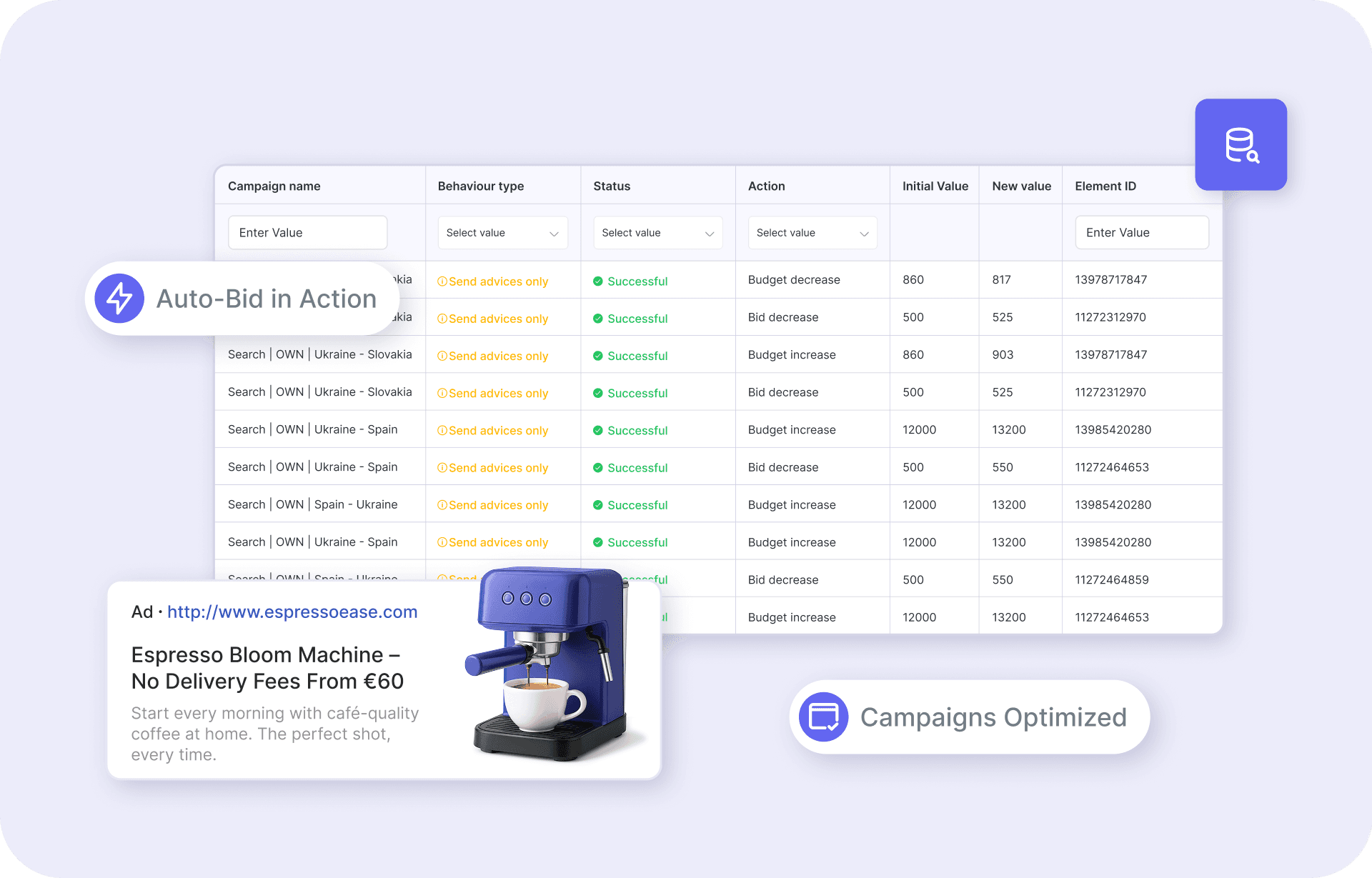
Make settings for each of them separately. Set the necessary goal and frequency of launching changes. There are available daily, weekly, or two-week periods of data processing and applying.
Step 3
Achieve results
Now the system will automatically make changes as set. Thousands of bids and changes are under control.
Already trusted by 50+ large marketplaces, e-commerces, and marketing agencies:
Already trusted by 50+ large
e-commerces, agencies and other businesses:



READY?
Ready to automate your ads?
Automate ad creation, improve performance, and save time. Book a demo today to see how G-MOS can boost your campaign results.